Until now, finding new companies to target, tracking down the right contacts, and turning them into real prospects often meant stepping outside your CRM.
A separate data tool here, a spreadsheet there, and a lot of manual copy-pasting to get any of it into Membrain. Insight Engine changes that.
Company and Contact discovery is now built directly into Membrain, so you can go from "who should we be talking to?" to a qualified Prospect in your pipeline, without switching tabs.
Discover, right where you work.png?width=250&height=430&name=Group%20185%20(1).png)
From inside Membrain, you can now:
- Find new Companies filtering by industry, size, location, and more
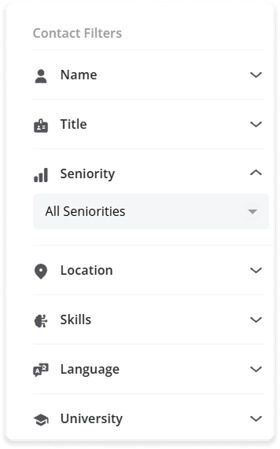
- Find Contacts at those companies, with filters for seniority, keywords, and location, to name a few filters available
- Add what you find straight into Membrain. Review your search results before selecting the one's of interest, and add as a Company and Contact, or jump straight to creating a Prospect, ready to enter your process.
It really is that simple. The data you discover becomes actual Leads or CRM records in a couple of clicks.
 A quick example
Say you're expanding into a new vertical.
You open your Prospects list, select Find New Contacts, and set two things at once: the kind of companies you're after (industry, size, location, etc) and the kind of people you want to reach (seniority, job title, skills, etc). Instead of running two separate searches, Insight Engine matches them together and hands you a list of contacts at companies that actually fit what you're looking for.
From there, it's just a matter of picking the ones worth pursuing. You select the contacts you want, add them straight into Membrain, and even create prospects as you go.
Once you're done, a quick link takes you straight to everything you just added, so you can hand it off to your outreach process without hunting for it.
That's a morning's worth of prospecting research, done in a few clicks!
Give it a try today
Head to a Prospect or CRM List and look for Find New Companies or Find Contacts to get started. Or jump over to our Help Center where there's plenty to get you started, while our support team is always happy to help.
Enjoying using Membrain? Great! Help us spread the word about how great Membrain is and write a review on G2Crowd
Help us spread the word about how great Membrain is and write a review on G2Crowd