Goals work best when they measure what really drives your business, and when you can see all of them in the grand scheme of things.
This release makes Custom Metrics more flexible and easier to set up for every Membrain customer, and gives admins one place to review every goal in the system.
Build Custom Metrics to suit your organisation
Custom Metrics are performance measures you define yourself. They track what’s specific to your sales process, such as revenue from a specific product line or pipeline value for a niche segment, alongside Membrain’s built-in KPIs.
- Create them with ease. First you choose what the metric is based on: Prospect, Sales Project, Account Growth Project, Activity or Static. Membrain then shows you only the values that fit, such as Value, Potential, Count, or a Numeric Custom Field from a filtered set of records, so its easier to get the result you're looking for.
- Track the products that matter. Sales Project metrics can now use product line items: Products: Revenue, Products: Profit or Products: Quantity. You can count specific products or all of them. Revenue and profit are converted to the right currency, and the metric works with goals and dashboards like any other.
- Choose how to show results. Static metrics now have an Aggregation setting. Keep Sum, which is the default, or choose Average to track the typical value for each period in goals and graphs.
Every goal in one view
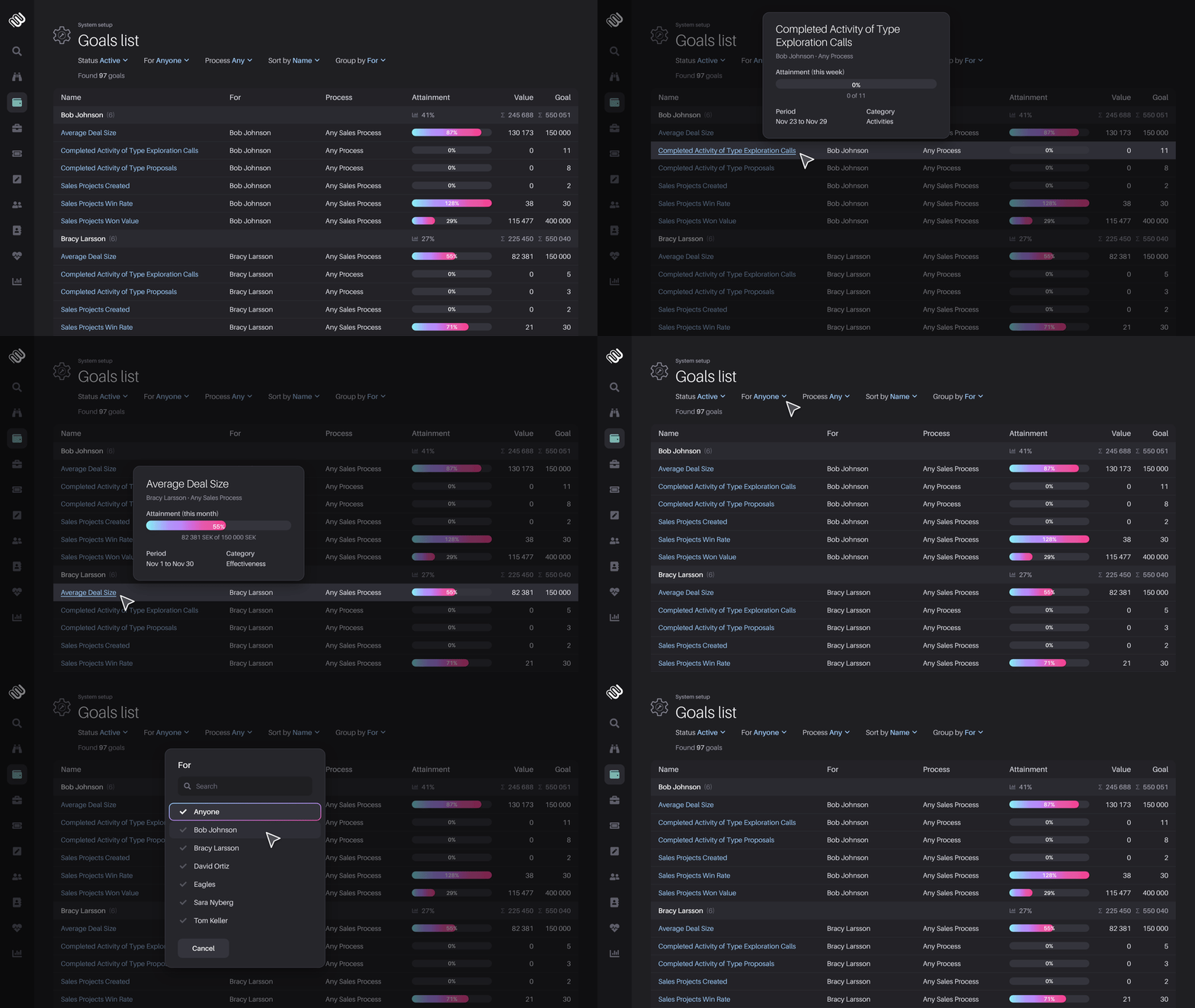
The new Goals List shows every goal in one place: user, team, company, process and Account Growth Project goals. You choose the columns, such as owner, attainment, current value and target. You can sort, group and filter by owner, process or status, with totals and averages calculated for you. Hover over a goal to preview it, or click to edit it.
A quick example
A sales operations lead wants the team to grow services revenue this quarter. She creates a Sales Project metric based on Products: Revenue for the service products only, sets team goals on it, then opens the Goals List and groups by owner. Within minutes she can see where every team stands, and which goals need a conversation before the next coaching session.
Try it today
Go to Custom Metrics to create your first product-based metric, or open the Goals List to see all your goals together. Our Help Center has more detail, and the team is happy to help you set up goals that fit how you sell.
Enjoying using Membrain? Great!
Help us spread the word about how great Membrain is and write a review on G2Crowd
Help us spread the word about how great Membrain is and write a review on G2Crowd