We've all been there. Toggling between screens, mentally piecing together where your prospects actually stand, trying to figure out which process needs attention right now. It's the kind of friction that eats into selling time and makes coaching conversations harder than they need to be.
Thats why we've introduced the Prospecting Overview
The new Overview view mode gives you a high-level snapshot of your entire prospecting efforts, organized by process and packed with the metrics that matter.
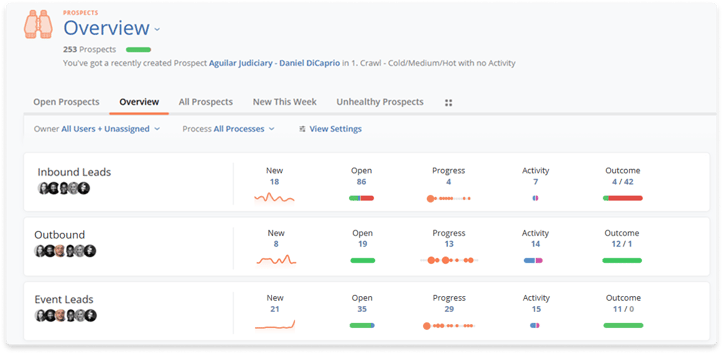
Here's what you'll see at a glance:
- New: Prospects added in the last 14 days
- Open: Active prospects, complete with health indicators
- Progress: Movement over the past 14 days
- Activity: Recent or upcoming engagement (14-day window)
- Outcomes: Qualified, disqualified, and converted prospects (30-day view)
Each process displays its owners, so you know exactly who's driving what. And every metric is clickable so you can drill into any bucket to see up to 100 prospects in that category, ready for review or action.
Why This Matters
Whether you're a rep trying to prioritize your day or a manager looking for more insights on overall prospecting efforts, the Prospecting Overview surfaces what you need immediately:
- Which prospecting processes are generating the most new opportunities?
- Where are prospects becoming inactive or stalled?
- Which teams are creating the most momentum?
- Are qualification rates improving or declining?
- Where should managers focus coaching efforts?
It's the difference between hoping you're focused on the right things and knowing you are.
Built for Clarity
We designed this view because prospecting shouldn't feel like archaeology. Your pipeline health, activity patterns, and conversion signals should be visible the moment you need them, without having to dig to find them.
The Overview is available now. Head into Prospecting, switch your View settings to Overview Mode (or simply go to the newly added Overview Tab), and see your entire prospecting efforts come into focus. Read more about the benefits of this new Overview feature in our Help Center!
Help us spread the word about how great Membrain is and write a review on G2Crowd



