Multiple Support Emails for Ticket Processes - Clearer Communication

Update on October 29, 2024 by Henrik Öquist

Are you juggling different types of support tickets? We’ve got you covered!

With our latest update, you can now set up separate support email addresses for different ticket processes, making your communication clearer and more organized.

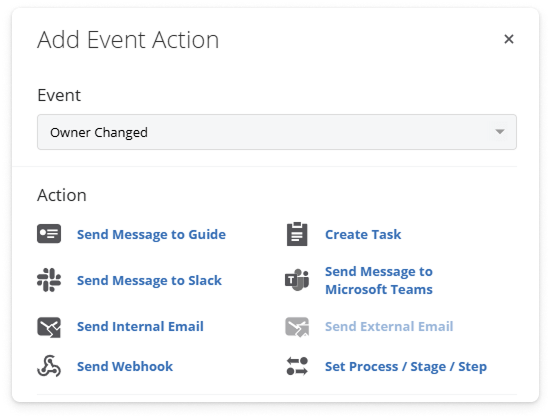
Support Emails

This new feature allows you to assign unique email addresses based on the type of ticket you’re handling. Whether it’s a quality control issue or supplier correspondence, each response can now come from the right email.

💡 What this means for you

Improved Clarity: By having separate email addresses, it will be easier for everyone to know where responses are coming from, helping to keep communication organized.

Better Organization: Streamlining your ticket responses will improve how you manage various ticket processes, making your workflow smoother and more efficient.


Other smaller updates

  • Preview Dialog Updates: You can now change both Stage and Status directly from the Preview dialog, allowing for quicker adjustments.
  • User Access Visibility: The User box now displays which products each user has access to, giving you clearer insight into access rights.

For more information, please refer to this Help Center article, use our in-product chat, or email us at support@membrain.com.

System Setup - A Fresh New Look for Easier Navigation

Update on October 28, 2024 by Henrik Öquist

If you're an admin managing settings for your team, you know how essential it is to have quick access to everything you need.

With our latest update, we’ve completely revamped the "Settings" section in System Setup to make it more user-friendly and intuitive.

System Setup

We’ve reorganized the Settings section to help you find and manage your configurations with ease. Whether you’re updating user onboarding or adjusting sales project details, everything is now laid out more clearly.

Product Update System Setup

💡 What this means for you

Quick and Easy Access: By improving navigation, you can quickly find key settings like ticket email configurations, prospect disqualify reasons, and details on sales project outcomes without frustration.

Logical Organization: Key configurations—like account owner and billing contact information—are now grouped more logically, making it simpler to manage everything in one place.

A Smoother Experience: We aim to create a more seamless experience for admins, allowing you to focus on what really matters—supporting your team and driving results.

For more information, please refer to this Help Center article, use our in-product chat, or email us at support@membrain.com.

More Control with Membrain Forms

Update on October 8, 2024 by Henrik Öquist

We’re making Membrain Forms even more powerful! 

You now have more control over multi-select fields with new options to add, remove, or set values—no more accidentally overwriting important data! We’ve also added advanced automation features and project creation options, so your forms work harder for you.


💡 Use cases:

  • No more data risks: You can safely add or remove values without worrying about overwriting existing information.
  • Automate like never before: Automatically enroll contacts or companies in automations right from form submissions, saving you time.
  • Advanced project creation: Set conditions for creating projects from forms to ensure they’re triggered only when needed.

This update gives you the flexibility to manage your data with confidence and streamline your workflows.

Other smaller updates

  • Create Contact & Company - Opt-in Enrichment
    We’ve updated the enrichment process so that no data is pre-filled automatically. Users now have the option to add only the information they need during contact or company creation, giving you more control and making it easier to enter the right details, without any extra hassle. (Desktop only)

For more information, please refer to this Help Center article, use our in-product chat, or email us at support@membrain.com.

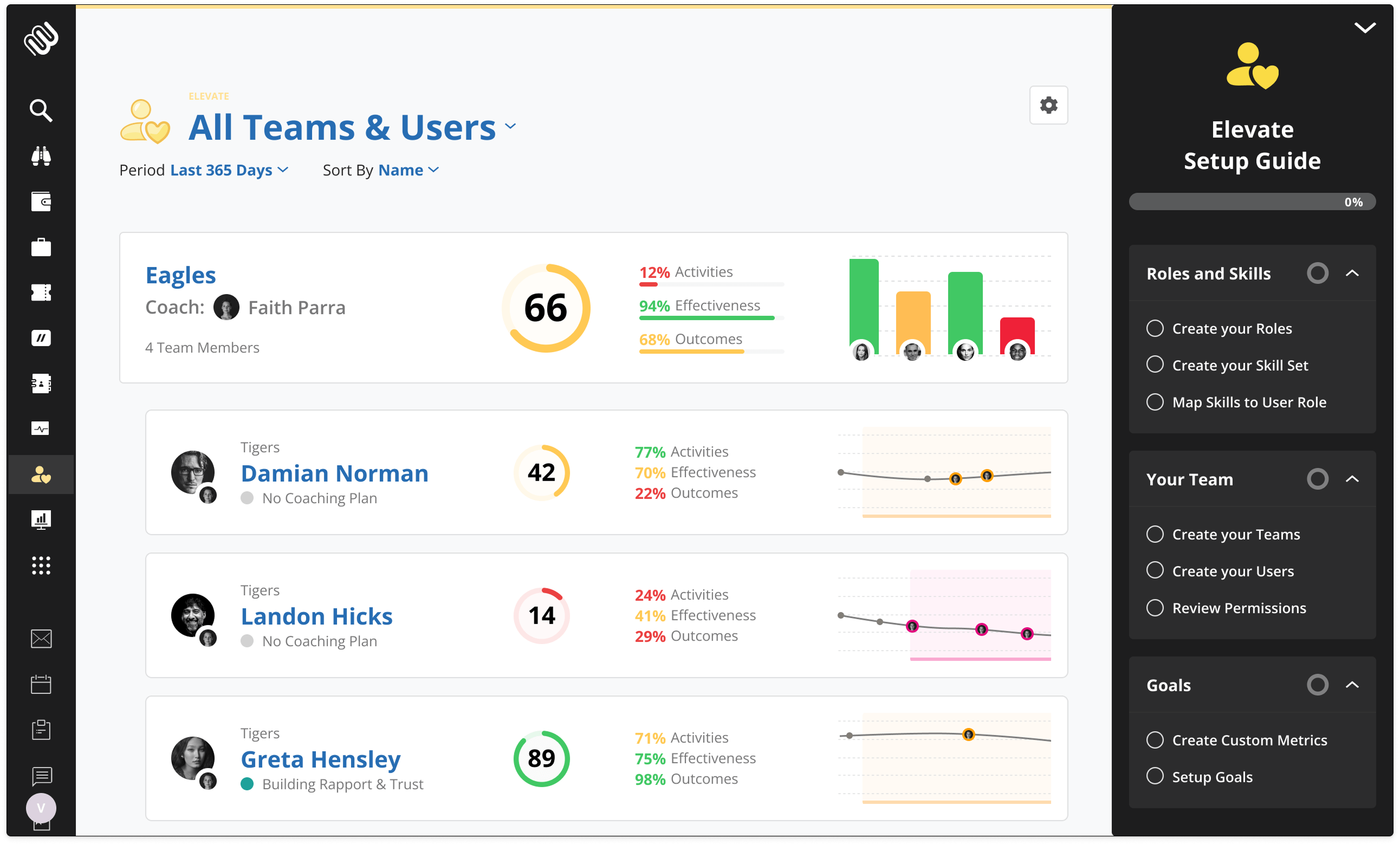
Elevate: Analytics - See Coaching & Skills in One Place

Update on October 7, 2024 by Henrik Öquist

We’re really excited to share that Elevate has a brand-new analytics view! 

This enhancement is all about giving you a clearer picture of your team’s coaching activities. You’ll be able to see who’s getting coaching, what skills we’re focusing on, and what challenges the team is facing.

Product Update Elevate Analytics

💡 Use cases:

  • Track Coaching Progress: Easily see who’s receiving coaching and how it’s helping them grow.
  • Spot Skills and Challenges: Get insights into which skills need a little extra attention and what hurdles your team might be encountering.

This new analytics experience is designed to help you make better, data-driven decisions, so you can coach your team more effectively and support their development.

In this updated view, users can now access a spider graph that averages key metrics over selected individuals, giving a clear snapshot of team performance. 

Spider Grapth Membrain Elevate

Combined with advanced top-level filters for people and periods, this creates a versatile analytics tool.

The focus here is not just on presenting data but on making it easier to understand coaching efforts, identify skill gaps, and uncover team challenges—all in one cohesive view. This is a major leap forward in streamlining how Elevate users can track and optimize their coaching processes.

For more information, visit our Help Center, chat with us via in-product chat, or email us at support@membrain.com.


Customizable Navigation - Pin Your Favorites

Update on October 5, 2024 by Henrik Öquist

We’re making it easier to navigate Membrain with our new pinning/unpinning functionality! 

You can now pin your most-used items to the top of the side menu, making them quicker and easier to access. Plus, your Pinned/Favorite Views are now just a click away, giving you more control over how you move through the platform.

Product Update Pinned Navigation

💡 Use cases:

  • Pin what matters: Customize your side menu by pinning your favorite tools for faster access.
  • Instant access to views: Your favorite views are now simpler to find and open, saving you time every day.

This update is all about making Membrain navigation more efficient, helping you stay focused on what’s important.

For more information, please refer to this Help Center article, use our in-product chat, or email us at support@membrain.com.

New Preview Dialogs and some other smaller updates

Update on September 23, 2024 by Henrik Öquist

We’ve enhanced the preview dialogs for prospects, sales projects, account growth projects, and more. 

These updates follow the style we introduced for contact and company previews, offering an improved look and feel.

New Preview Dialogs Product Update

💡 Use cases:

  • The new preview dialogs are easier to read. It is also customizable by process, ensuring that key information can be accessed and updated quickly.
  • You can now customize previews by process, ensuring the right information is clearly organized based on its relevance.

Other smaller updates

  • "Value of Open Account Growth Projects" goal moved to Outcome.
  • Improved and streamlined Role Assessments flow.
  • New filters for "Last Process Progress Date" to help focus on projects with or without progress during a specific timeframe.
For more information, visit our Help Center, contact us via in-product chat, or email us at support@membrain.com.


Elevate: New Daily or Weekly Check-in for Metrics

Update on September 20, 2024 by Henrik Öquist

Accurate and helpful insights are key to making coaching more effective, and this update helps make that easier.

If you're using Custom Metrics in Elevate, there's now a simpler, more intuitive way to get those metrics into Membrain. 


💡 Use cases:

  • Easily capture metrics that aren't already in Membrain, whether you're using Elevate as a standalone tool or if certain metrics are tracked elsewhere.
  • Encourage consistent behavior by giving your team time to reflect and wrap up their day or week. This practice helps them stay aligned with their goals and maintain focus.

Product Update Custom Metric Check-Ins Elevate

Need assistance with this feature? Check out our Help Center article or reach out via in-app chat or email us at support@membrain.com.


Elevate: Easier Coach Selection in Coaching Sessions

Update on September 18, 2024 by Henrik Öquist

In more complex coaching setups—where multiple coaches or external resources may be involved—it's now simpler to assign a coach for a specific session.

Coachees can select or change the coach during or after a session’s creation, offering flexibility for larger organizations with multi-tier leadership.

Change Coach Membrain Elevate

💡 Use cases:

  • In teams with multiple coaches, such as a VP of Sales, a sales manager, or an external expert, each session can now be attributed to the right person.
  • Coaching activities can now be reassigned or shared during transitions between coaches, providing a flexible tool for ongoing professional development.
For more information, read this Help Center article. You can also contact us via in-product chat, or email us at support@membrain.com.


Dashboard Exports, Negative Quantities, Enhanced Playbooks, and Easier Coaching Navigation

Update on September 5, 2024 by Henrik Öquist

We’re excited to introduce new features and improvements in Membrain to enhance your productivity. 

From greater control over dashboard exports to new features like support for negative quantities and more flexible playbook conditions, these updates are designed to streamline your workflow. Coaches will also appreciate easier navigation in Elevate, making it simpler to manage and coach teams. Read on to learn more about these updates.

Dashboard Permissions Exports

You now have more control over who can export dashboards as PDFs or extract data into Excel for deeper analysis outside Membrain.

"Products" Now Support Negative Quantities

Many of our customers use products in Sales projects, and we have had requests to support negative quantities for various scenarios. Membrain now supports this feature.

Process Conditions for Playbooks and Rules Now Support "None of" on Multi-Select Fields

If you are managing multiple industries but only want specific playbook steps or rules for a few, you used to have to manually select all the ones you didn’t want. Now, you can simply pick the ones you do want and set the condition to "none of," making this much easier to manage.

Easier Navigation in Elevate for Coaches

For those with complex coaching setups in Elevate, it is now simpler to find and coach specific teams and individuals. You can quickly access the "teams you coach" and "individuals you coach" for more efficient coaching sessions.

Do you have a question about this update? Visit our Help Center, contact us via in-product Chat, or email us at support@membrain.com.

Current Stage Starting Date - Enhanced Tools for Stage Progress

Update on September 3, 2024 by Henrik Öquist

Moving through the stages of your sales process is crucial in new business sales, account management, and other revenue-related workflows.

We have added powerful new capabilities around tracking the exact date when your prospects, sales projects, and account growth projects enter a new stage.
 
This feature, called the Current Stage Starting Date, can be used in automations, date calculations, filters, and dashboard graphs. It helps you track progress across your pipeline and other revenue-generating efforts more easily.

💡 Use cases:

  • Filter by the Current Stage Starting Date to see which deals in your pipeline advanced this week.
  • Visualize stage starting dates in graphs to track deal movement by week, month, or quarter.
  • Use this date in automations or calculations to estimate potential delivery dates and more.

Do you have a question about this update? Visit our Help Center, contact us via in-product Chat, or email us at support@membrain.com.

More updates to Membrain