Researching and summarizing are some of the most powerful capabilities in Insight Engine - but until now, they had to be initiated one project at a time.
Of course those repetitive tasks can quietly drain your valuable time. This update cuts the busywork and gives it back to you.
In this update, we're bringing extra flexibility to List Views Batch changes, Process Events, and Automations. Whether you're working with a handful of projects or hundreds, it's now easier than ever to generate the insights you need, exactly when you need them.
1. Run AI Research and AI Summarize Across Multiple Projects in Seconds
Need to prepare for a pipeline review? Research a new target account list? Refresh project summaries before a team meeting?
You can now select multiple projects directly from a List View and run AI Research or AI Summarize in bulk via a Batch change. This gives you flexibility and control in choosing which projects you want to include in your routine.
-
List View Batch AI Research
Available in Prospects, Sales Projects, and Account Growth Projects, you can research any number of selected projects using your own Custom Research prompt or one of three built-in research types.
.gif?width=723&height=407&name=download%20(4).gif)
Choose between:
-
- Company Overview
- Company News
- Industry Trends & News
Instead of researching each project individually, Insight Engine handles them all in one operation, giving your team consistent, up-to-date intelligence in a fraction of the time.
-
List View Batch AI Summarize
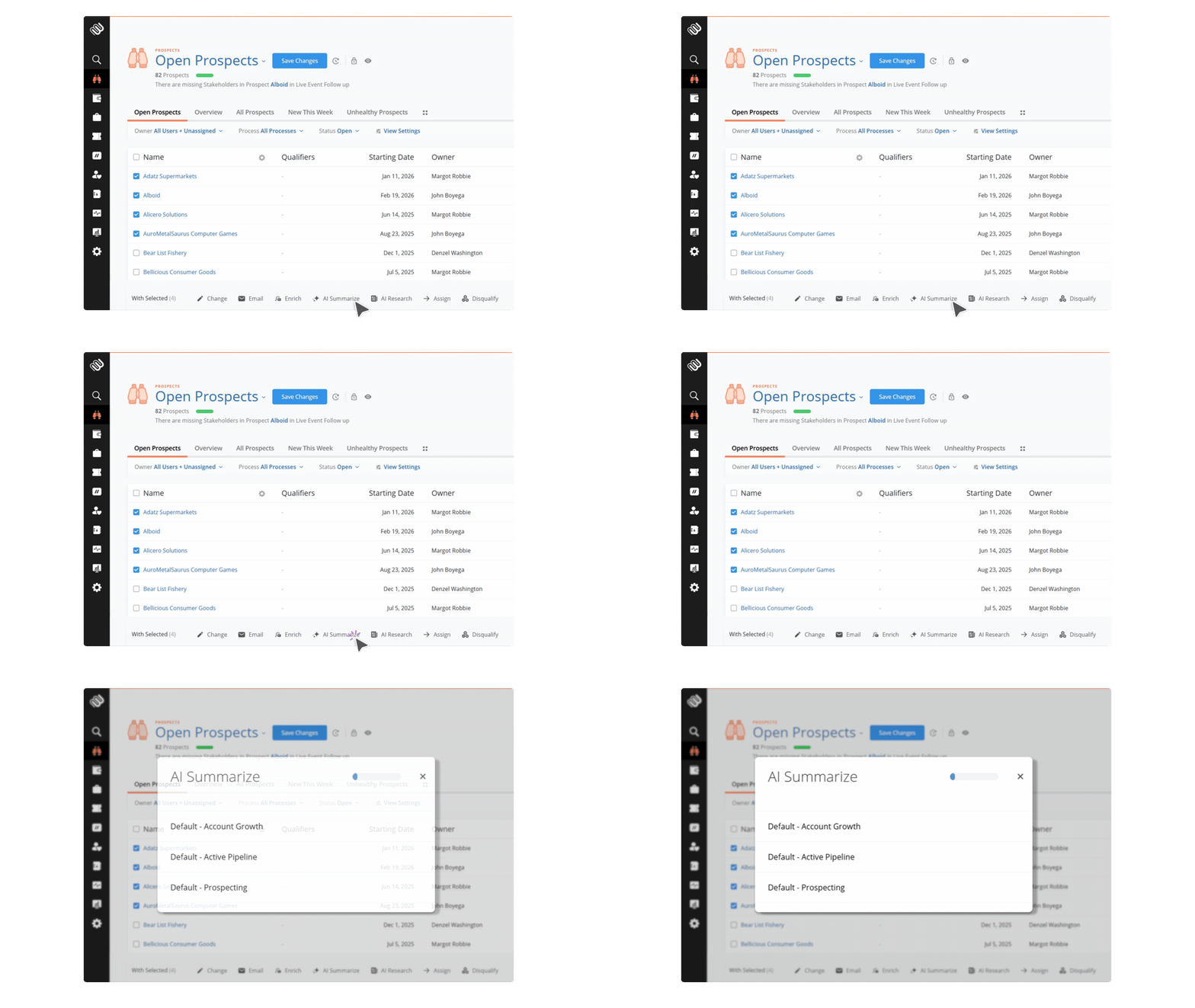
AI Summaries can now be generated in bulk across Prospects, Sales Projects, and Account Growth Projects, Tickets and Flow Projects
Choose between:
-
- Your Default Summary prompt
- Any Custom Summary prompt that's applicable to the selected projects
It's the fastest way to bring an entire portfolio of projects up to date before customer meetings, account reviews, or sales coaching sessions.
2. Let Your Sales Process Trigger AI Automatically
AI becomes even more powerful when it happens automatically, when triggered. That's why we've introduced AI Research and AI Summarize as new Process Event Actions.
Now, whenever a project reaches a key milestone in your sales process, Membrain can automatically trigger AI in the background.
3. Build AI Into Your Automations
We're also extending these capabilities into Automations, making it easier to build intelligent, self-updating workflows.
This means research and summaries can be generated automatically on a schedule that suits your team, keeping projects enriched with relevant context while reducing manual effort.
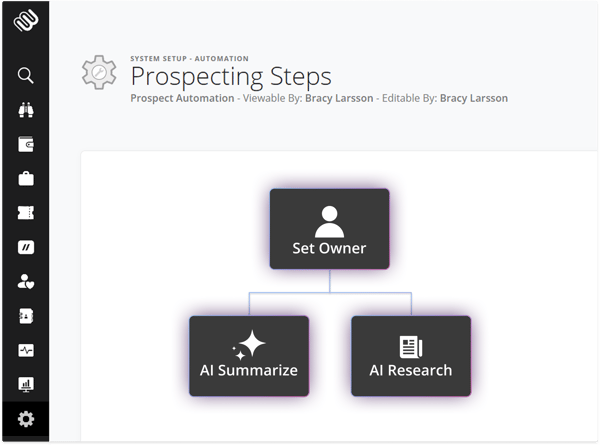
AI That Fits Naturally Into Your Workflow
These updates are all about making AI available where your team already works.
Instead of stopping to manually trigger research or summaries, you can now:
-
- Research dozens of projects at once
- Generate summaries in bulk
- Automatically research projects as they move through your process
- Build AI directly into your automations
- Keep projects continuously updated with fresh insights
The result is less repetitive work, more consistent information, and more time spent acting on insights instead of generating them.
We hope these new capabilities help your team unlock even more value from Insight Engine by making AI research and AI Summarize a seamless part of your everyday sales workflow.
Help us spread the word about how great Membrain is and write a review on G2Crowd



