Popular Content
Membrain for:
The AI Summarize feature in Membrain helps you quickly understand what’s happening on a project by generating a concise, readable summary using real project data. Whether you're preparing for a meeting, reviewing a deal, or catching up on a project you haven’t touched in a while, AI Summarize allows you to get up to speed without digging through notes, activities, or fields manually. This feature is available across all project types and can be tailored to your specific team needs.
AI Summarize is available within a Project through the Insight Engine.
To access it, open a Project and click the Insight Engine icon in the top right corner. From there, select AI Summarize to generate a summary of the current project.
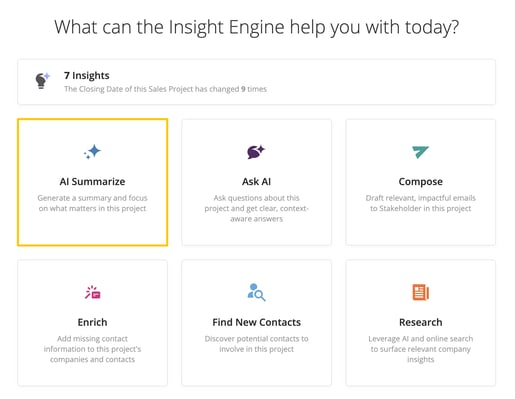
When you run AI Summarize, Membrain creates a short summary based on the information available within the project. This can include fields, stakeholder information, activities, and other relevant project data. The goal is to give you a focused snapshot of what’s going on, without requiring you to piece it together yourself.
You can run a quick summary using the system’s default summary prompt, or you can apply a custom AI Prompt to generate a summary tailored to your workflow. This is where the real flexibility of the feature comes into play.
By using your own AI Prompt, you decide what kind of information the summary should focus on. For example, you might create a prompt that produces a deal status report, a summary tailored to your sales methodology, or a specific use case like a cancellation review. The summary reflects whatever logic and structure you've built into that prompt.
To use a custom prompt, you’ll select from the list of AI Prompts already created in your system or build a new one. These prompts define how the summary is generated and what type of project information is included.
If you're not satisfied with the first result, you can refresh the summary to generate a new version. Once you have an output you’re happy with, you can copy it to your clipboard for use elsewhere or save it directly into a text or rich text field within the project. This flexibility allows AI Summarize to support a wide range of use cases, from internal status updates to external communication, depending on how you've configured your prompt.
Once a summary has been created, you have several options for what to do next. If the result isn’t quite right, you can refresh the summary by pressing this icon  to generate a new version. You can also copy(
 )the summary to your clipboard to use elsewhere, such as in an email or external document.
If you want to keep the summary within Membrain, you can either save it  directly into a text or rich text field on the project, or save it as a read-only AI Note in the Activity Stream. Saving to a field requires that a compatible field is available on the project.
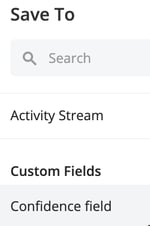
Saving to the Activity Stream is available when the summary is generated within an activity that’s linked to a project-related entity, such as a Prospect, Sales Project, Account Growth Project, Target, or Flow.
AI Summarize can also be triggered automatically as part of an Event. This allows project summaries to be generated in the background when a specific action occurs, ensuring important information is captured without requiring users to manually generate a summary. For information on configuring Events, see our Events article.
When an Event triggers AI Summarize, it uses either the default summary or a selected AI Prompt, depending on how the Event has been configured. The summary is generated in the background, and you can monitor its progress from the Membrain Guide. Once complete, you'll receive a notification that the summary is ready.
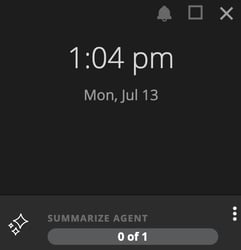
After the summary has finished generating, click on the summarize agent to see the results. Hover over the completed AI Summary entry to view the generated output.
For example, you might configure an Event to generate an AI Summary whenever a project completes a "Manager Review" step. By the time the project is ready for review, an up-to-date summary has already been generated, giving managers immediate context without needing to review the entire project history.
AI Summarize is useful whenever you need to quickly understand or communicate the current state of a project. Some teams use it to generate updates ahead of internal check-ins or pipeline reviews. Others create prompts that help document why a deal was lost, or capture insights aligned to a specific methodology. Since the feature is powered by AI Prompts that you create, your team can adapt it to whatever use cases make the most sense for your sales process.
AI Summarize gives your team an easy way to turn raw project data into clear, actionable insights. With default summaries for quick reviews and customizable prompts for more structured outputs, it’s a flexible feature that helps sales professionals stay informed without getting bogged down in manual updates.
For best results, pair this feature with well-configured AI Prompts and ensure your Messaging Center is up to date. If you need help setting up your AI Prompts or understanding how to tailor your summaries, reach out to your Membrain administrator or contact support at support@membrain.com.




