Enrichment in Membrain helps keep your CRM data current and complete by offering updates to company and contact records. With the Enrichment functionality, sales teams can access verified information and discover new contacts more efficiently—reducing the need for manual research and supporting stronger prospecting and project execution.
Enrichment allows you to supplement your existing contact and company records with updated or missing details pulled from integrated external data providers. These include Membrain’s enrichment source, Apollo, and ZoomInfo. The service suggests new data for empty fields only, helping ensure that your current entries remain untouched while offering new insights where information is missing.
Enrichment is now available in a more consistent and accessible location across the platform. You can initiate enrichment from the top toolbar of the following project types:

Prospect Projects
Sales Projects
Account Growth Projects
In these areas, clicking the Enrich button opens a unified dialog that allows you to:
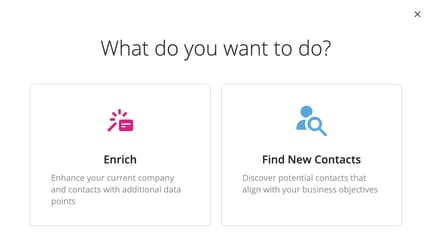
Enrich existing company and contact information
Find and add new contacts associated with a company
This single dialog makes it easier to keep your CRM updated and discover key stakeholders within a project context.
To enrich company records, Membrain uses the company website as the key identifier. When a valid website is present, the Enrichment dialog can suggest:

Company icon
Phone number
Email address
Website (if missing)
Social media links (LinkedIn, X, Facebook, Instagram)
The Enrichment dialog displays only fields that are currently empty, so your existing information is preserved.
To enrich contacts, the required data depends on which provider is selected in your system settings.
Apollo: Requires Name and Company Domain or Email
ZoomInfo: Requires Name and Company Name (additional data such as LinkedIn, Email, and Title can improve results)
Membrain: Requires Email
Fields that can be updated include:
Job title
Work phone and mobile
Email address
Social media profiles (LinkedIn, Facebook, Instagram, and others)
Just like company enrichment, updates are only suggested for fields with no existing data.
In addition to enriching existing records, you can use the Enrichment dialog to find new contacts related to the company linked to your project. Selecting the "Find new contacts on this company" option will allow you to browse and add relevant individuals to your project or to specific stakeholder roles.
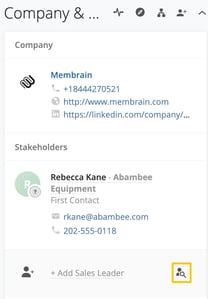
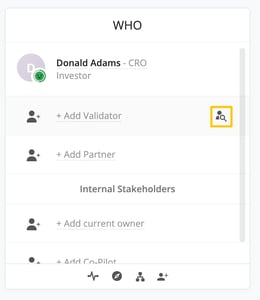
You can also initiate contact discovery directly from the Company & Contacts box on the right-hand side of a project. If a stakeholder role is empty, a hover icon will appear, allowing you to start the discovery process for that role. This same functionality is available in the Stakeholders section inside a Sales Project.
Prospecting: Sales Projects:
Administrators can configure which data source (Apollo, Zoominfo, or Membrain) is used for enrichment under System Setup > General Tab > External Data. Based on your selection, Membrain will use the relevant provider to perform enrichment and contact discovery actions. If no provider is manually selected, your system will choose Membrain as the data provider.
For guidance on setup and configuration, see the Apollo Integration article and ZoomInfo Integration article.
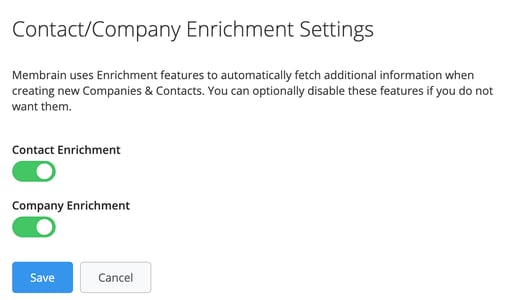
If needed, the Enrichment functionality can be disabled by a Membrain Administrator. This setting is available in System Setup under the General tab. You can disable enrichment separately for companies and contacts via the Contact/Company Enrichment Settings panel.
The updated Enrichment feature centralizes access, combines enrichment and contact discovery into a single interface, and supports integrations with multiple data providers. This improvement simplifies workflows, helps teams maintain accurate records, and accelerates outreach through faster identification of relevant contacts.
For further assistance, please contact your Membrain Customer Success Manager or email support@membrain.com.




