AI Composer is your built-in writing assistant in Membrain, designed to help sales teams and coaches create high-quality content—quickly, consistently, and with minimal effort. Whether you're drafting an email, logging a note, planning a coaching session, or writing a task, AI Composer helps you move from idea to message with speed and clarity.
This feature is integrated directly into the Membrain workflow, offering intelligent suggestions and content previews exactly where you need them. This allows you to focus on engaging your customers, not formatting your text.
AI Composer is available in most places where written communication happens in Membrain. This includes:
Emails
Notes
Appointments
Calls
Tasks
Coaching Activities
Coaching Plans
Wherever you're typing, AI Composer is close by and ready to suggest, generate, or help rewrite your content.
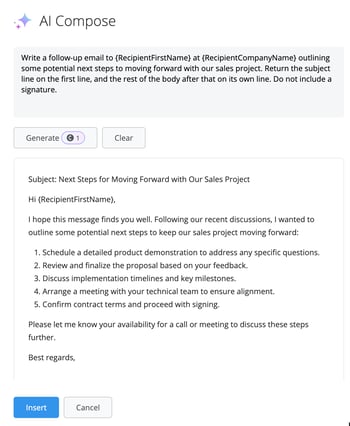
When you begin writing, you can open AI Composer to generate content based on a suggested prompt or your own input. The tool understands the context of where you are in the workflow and offers prompt recommendations that make sense for that activity. For example, if you're preparing a meeting agenda or logging a customer call, AI Composer may suggest a prompt to summarize key points or outline follow-up actions.
Once the content is generated, you'll see a preview of the AI's suggestion before it’s added to your field. You can review it, make edits, and decide if it’s ready to use. This ensures you stay in control of your messaging and that every piece of content aligns with your company’s voice and sales strategy.
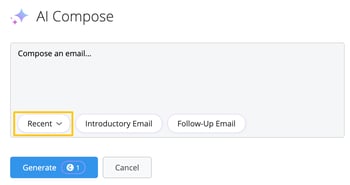
Recent queries are saved automatically, and you can quickly reuse them using the Recent selector. This makes it easier to apply your favorite or most-used prompts without having to retype them.
In addition to creating new content, AI Composer includes a Rewrite feature that helps improve or adapt existing text. You can highlight any portion of text in supported editors and choose the AI Rewrite option from the floating menu. From there, you can choose how you want the content to be modified.
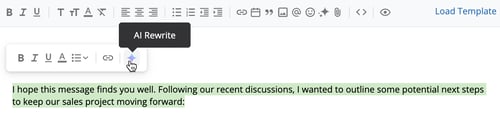
Available rewrite actions include:
Summarize
Expand
Fit Company Tone of Voice
Change to list
Change to paragraph
This feature allows you to clean up rough notes, adjust tone for different audiences, or quickly shift between structured and narrative formats—all without starting from scratch.
The AI Rewrite feature is available across several components in Membrain, including:
Email Composer
Coaching Plans
Content Hub Content Cards
Rich Text Fields
Email Template and Snippet Editors
Coaching Activities
Ticket Creation
It is not available in signature editors such as Branding, My Settings, or Email Footer configurations.
AI Composer helps your team spend less time staring at a blank page and more time taking meaningful action. Messages stay on-brand, content is clearer and more strategic, and repetitive writing tasks are minimized. The ability to preview, rewrite, and reuse content ensures flexibility without sacrificing quality.
Whether you’re coaching a team member, replying to a customer, or planning your next follow-up, AI Composer helps you say the right thing—faster and with more confidence.
AI Composer is designed to support content creation across the sales workflow, combining speed with precision. With contextual suggestions, content previews, and built-in rewriting tools, it enables sales professionals and coaches to write smarter, stay consistent, and keep momentum throughout the sales process.
If you need help setting up prompts or want advice on how to get the most from AI Composer, contact your Membrain administrator or email support@membrain.com




