Popular Content
Membrain for:
Membrain Flows gives you a structured way to manage work - anything from simple checklists to complex, cross-functional projects. By setting up Flowss, you make it easy for your team to stay aligned, accountable, and focused on what really matters.
This article will walk you through the first steps of creating and using Flowss inside Membrain.
Think about the processes in your work that would benefit from more clarity. Some common starting points are:
Customer onboarding journeys
Internal onboarding checklists for new hires
Marketing campaign planning
Recurring team routines (e.g. monthly reporting, reviews, events)
Pick one process that feels important and repeatable.
You can choose to build your Flows process from scratch, or start from an existing template process. Templates provide a ready-made structure that you can customize to fit your specific needs. This can save time and help ensure consistency across similar projects. If you decide to start from scratch, then it's time to choose a Parent Type based on your needs:
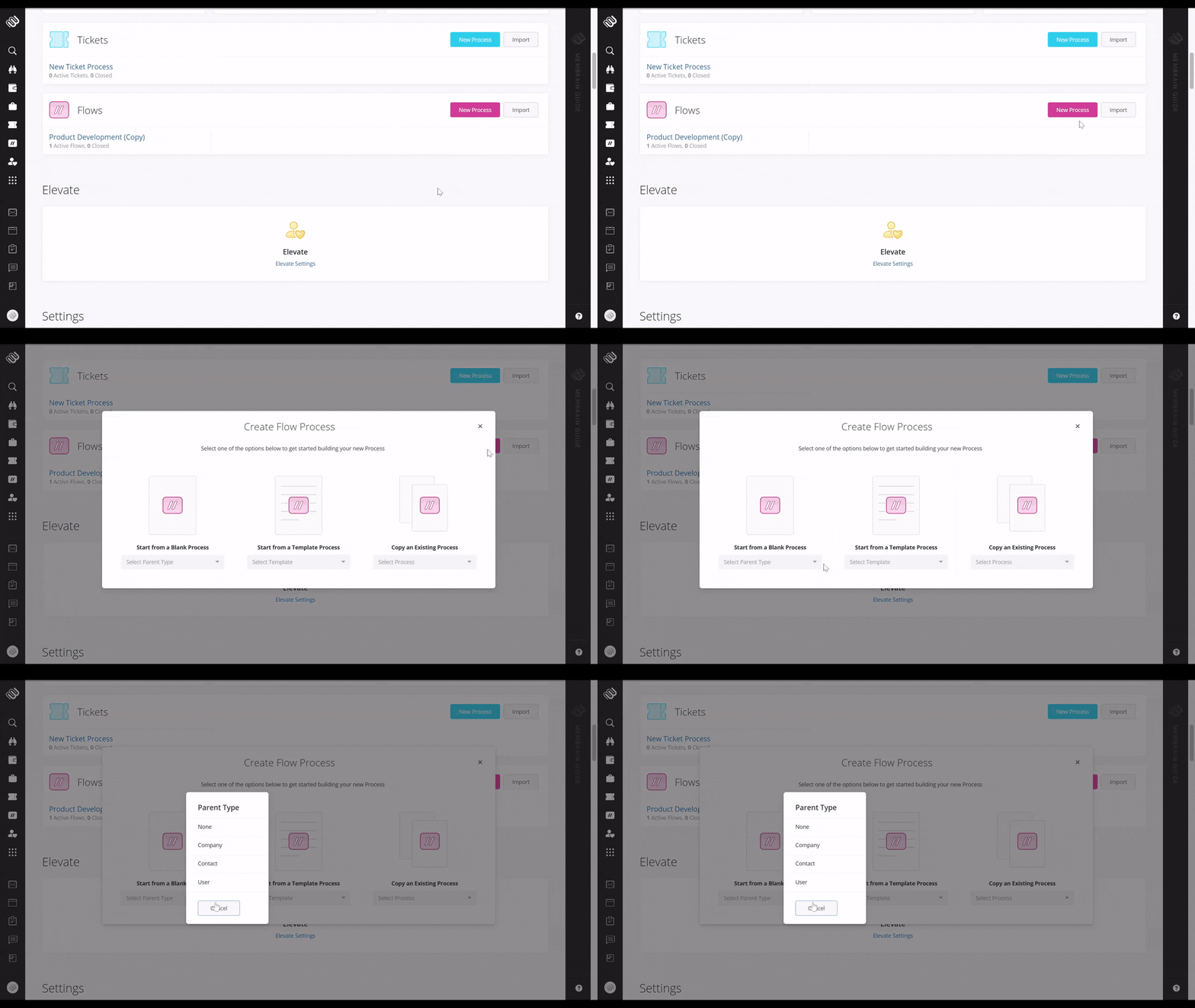
Just like any other process in Membrain Flows processes are built on Stages and Steps. Within each Stage, you can:
Add clear Steps with Checklists, Details & Fields and Actions
Attach content or resources
Add Stakeholder roles to track the people that are involved.
Add Process Tools - like Milestones, Playbooks, Qualifiers, Importance and Assigned Steps
Start simple. You can always expand or refine as you go.
For many Flowss, success depends on having the right people involved. You can:
Add internal stakeholders (teammates or departments) who need visibility or responsibility
Add external stakeholders (customers, partners, candidates) if they’re part of the process
This ensures the Flows reflects reality - everyone who has a role in moving things forward can be included.
Once your Flows is set up, try it out in real work:
Does it guide the team the way you want?
Are the Steps and Stages clear?
Are the right Stakeholders involved?
Make adjustments as needed. Flowss are flexible and fully editable.
Once you are happy with the Flows Process and it's got a name your team will recognize, you can publish it and start using it. Keep in mind that you might have to refine parts of it based on feedback and success rate.
Every Flows project has an Owner, just like other project types in Membrain, but if the projects in your process is supposed to be progressed collaboratively my several people or teams having a walk-through training session with the team leaders or collaborators involved can be advisable. This will help everyone know clearly what's expected of them.
You’ve now created your first Flows! From here, you can:




