Popular Content
Membrain for:
The ability to mass import Activities from another program into Membrain goes a long way in helping you keep all your information in one place and easy to find.
For example, you might want to export Task, Appointment, Note, Email or Call details from a previous system and import them into Membrain. This is done from the Activities list view in Membrain.
First of all you need to decide what kind of activity you have, and how it should be imported into Membrain so it is in line with our 5 Activity Types.
The first step is to collect the data you want to import from its current source and make sure it's complient for import into Membrain. Once you're happy with your spreadsheet you can import it to Membrain.
The instructions below will guide you through the import prep and execution process and help you ensures all your data is aligned and imported into the right fields in within Membrain, and your data integrity is maintained.
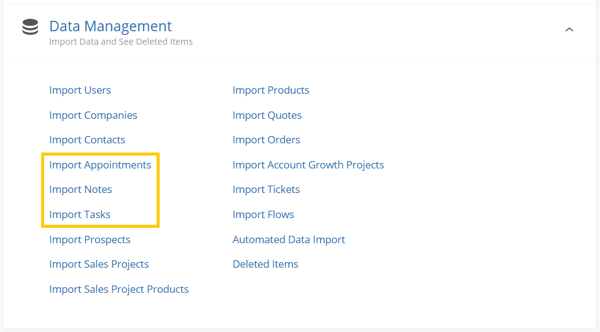
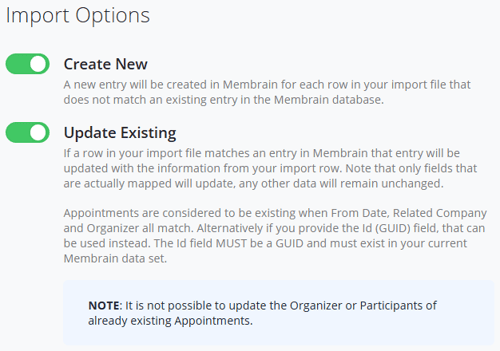
It's important to note that when Updating Existing activities - Appointments, Notes and Tasks have different data requirements. These are listed under the Update Existing section of the Import Settings for each Activity import type, and are as following:
Appointments: are considered to be existing when From Date, Related Company and Organizer all match. Alternatively if you provide the Id (GUID) field, that can be used instead. The Id field MUST be a GUID and must exist in your current Membrain data set.
Notes: are considered to be existing when Date, Related Company and Organizer all match. Alternatively if you provide the Id (GUID) field, that can be used instead. The Id field MUST be a GUID and must exist in your current Membrain data set.
Tasks: are considered to be existing only based on the Id (GUID) field. The Id field MUST be a GUID and must exist in your current Membrain data set.
Also observe that it is never possible to update the Organizer of the Participants of already existing Activities, regardless of type.
Other considerations are:
Comparing to Membrain, other systems will contain different names and data for various kinds of Activities. Its important to be aware of these differences, and decide which Activity Type suits your data best.
Note: It is important to check the spreadsheet itself for duplicates BEFORE you begin the import, as Membrain will not check for duplicates on the file itself.
Managing Duplicates - Membrain uses certain fields as unique identifiers during the import to avoid creating duplicate records. For Notes, the fields below are checked for pre-populated data and if found, the record will be skipped/overwritten based on your Import Settings:
Mandatory Fields
Optional Fields
Managing Duplicates - Membrain uses certain fields as unique identifiers during the import to avoid creating duplicate records. For Notes, the fields below are checked for pre-populated data and if found, the record will be skipped/overwritten based on your Import Settings:
Mandatory Fields
Optional Fields
Managing Duplicates - Membrain uses certain fields as unique identifiers during the import to avoid creating duplicate records. Tasks are considered to be existing only based on the presence of the Id (GUID) field in your import data set and in Membrain.
Mandatory Fields
Optional Fields
It's not possible to import historical emails into Membrain as actual emails. To import historical email conversations into your Membrain account, we recommend importing these as Notes, and if desired, flag them as emails (using the Email activity type option) so they are easily distinguishable from other standard Notes.
The Notes import has been built to better manage the HTML terminology that often is included in emails exported from an email client.
If you need more information on importing Activities, Mapping Fields, Mandatory Data or other import related subjects, please review the Data Import - Fundamentals article before proceeding with the import.
If you encounter any problems when importing, please contact our Support Team at support@membrain.com.




