Your company details are one of your most fundamental and valued assets when it comes to information. For this reason we've made it as straight-forward as possible to allow you to import all your Company information into Membrain in a few, not so complicated steps.
An overview
The first step is to download this Template Excel Spreadsheet, which has the default columns you need to get started and add the data you want to import.
Once you're happy with your spreadsheet, import this file into Membrain. This ensures all your data is aligned and imported into the correct fields within Membrain and your data integrity is maintained.
Files must be in XLS format (Excel 97/2000/XP/2003) or XLSX format (Excel 2007)
Download the Template
- Click on this link to download the Template Excel file
- Start organizing your data to make it ready for import
Add your data
- Export the data from your other systems to Excel
- Save the file as an XLS (Excel 97/2000/XP/2003) or XLSX (Excel 2007) file
- Make sure your data match the template either by formatting it according to the template or by copy-pasting it into the template (copy-pasting is not recommended for larger data sets)
Import into Membrain
- From System Setup - Data Management - Import Companies
- Click on Upload a File to Import on the center of the screen and browse to the file you have just created
- Import Options: Choose to Create New entries, Update Existing, both and if you want to add a Label
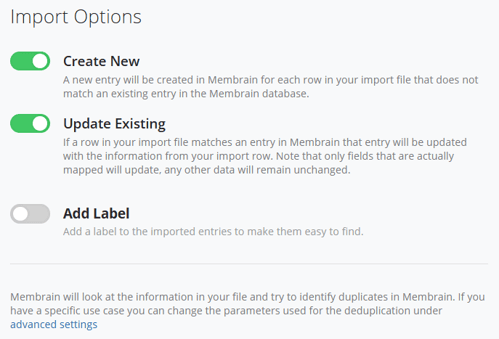
- Click Next
- Map the Fields by aligning them to their correct names. You will see errors and will be able to work through them in your spreadsheet until you are fully confident that your data is solid and ready to be imported
- Click Import, and you're done!
Considerations
It is important to check the spreadsheet itself for duplicates BEFORE you do the import, as Membrain will not check for duplicates on the file itself.
Membrain uses certain fields as unique identifiers during the import to avoid creating duplicate records. For Companies, the fields below are checked for pre-populated data and if found, the record will be skipped/overwritten or you will be asked how to proceed (based on what you have decided at the beginning of the import).
- External Identifier (if used)
- Name (of the Company)
- If using a spreadsheet with multiple sheets, Membrain will only use data in the first sheet
- Files must be in XLS format (Excel 97/2000/XP/2003) or XLSX format (Excel 2007)
- Files must be structured with 1 Company per row
Mandatory fields when importing Companies
- Name (of the Company)
- (Optional) Additional/other dedupers added under Avanced Settings (see section below)
Advanced Settings
The default settings are configured to help prevent importing or creating duplicate entries. These defaults can be reconfigured to match your unique data set if necessary. Learn more in Import Advanced Settings (recommended only to be used by advanced users)




